
How to save the photos of all your eBay listings at once
Short answer. eBay has no button to download the photos of all your listings. Its reports export text (titles, prices, quantities), not the pictures. The Chrome extension eBay Image Downloader finds every listing of a store, a search or your Seller Hub, and saves the photos and videos of each one in its own folder, with an Excel spreadsheet. It is a one-time payment of $29, with no subscription.
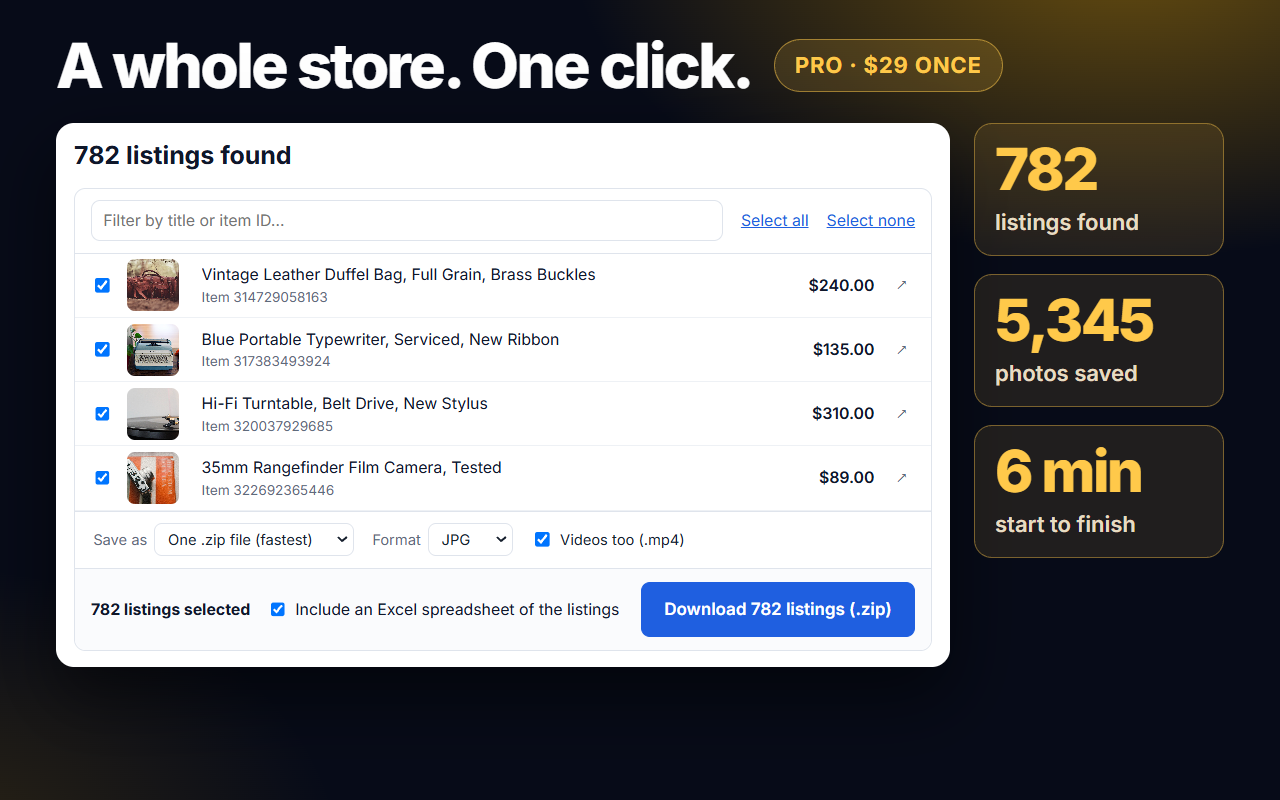
Measured on a real store: 782 listings, 5,345 photos and 161 videos in 6 minutes.
When you need this
- You are moving your items to another site or to your own shop, and you do not want to photograph everything again.
- You are closing a store, or selling your inventory, and you want to keep the photos.
- You lost the originals (new phone, dead hard drive) and eBay is the only place they still exist.
- You want a backup. According to eBay's help pages, photos stay in ended listings for up to 90 days.
Step by step
- Install eBay Image Downloader from the Chrome Web Store.
- Open the list you want on eBay: your store page, a seller's items, a search result, or your active listings in Seller Hub.
- Click the extension icon, then "Find every listing". The extension reads every page of the list and shows how many listings it found. This part is free: you see the count before paying anything.
- Untick what you do not need. A filter box lets you keep only the listings whose title contains a word.
- Click download. A progress bar shows the time left, and you can cancel at any moment.
What you get
One folder for the download, named after the store or the search, with the date and time:
eBay photos - yourstore - 782 listings - 2026-11-24 14-05/
    photos.zip
    listings.xlsx
Inside the .zip, one folder per listing, named after the listing:
Vintage Leather Duffel Bag/
    01.jpg
    02.jpg
    03.jpg
    video.mp4
    View on eBay.url
- Photos are numbered in the order of the listing, in the largest size eBay keeps (up to 1600 px), as JPG, PNG or WebP.
- Videos are saved as .mp4, with sound.
- listings.xlsx opens in Excel, Google Sheets or Numbers. One row per listing: Title, Price, Photos (how many), Link, Photo links, Folder, Item ID. The Folder column tells you which folder belongs to which row.
The photo links in the spreadsheet are the addresses of the pictures on eBay's servers. Many shop platforms accept image addresses in their import files, so the spreadsheet can serve as a starting point for an import.
How long it takes
Two real downloads of whole stores:
| Listings | Photos | Videos | Time |
|---|---|---|---|
| 782 | 5,345 | 161 | 6 minutes |
| 1,076 | 7,477 | 258 | 12 minutes |
Time depends on your connection and on how many videos the listings have.
Compared with the other ways
- By hand. Open each listing, right-click each photo, "Save image as". For 200 listings with 6 photos each, that is 1,200 saves.
- eBay's own reports. Seller Hub can export your active listings to a file, with titles, prices and quantities. The file does not contain the photos.
- Cross-listing software. Tools that copy listings from eBay to other marketplaces are a good fit if you list on several sites every week. They are monthly subscriptions. If you only need your photos once, a one-time tool costs less.
Limits
- Up to 10,000 listings per download. That is also the most eBay itself shows for one search.
- Large stores are saved as several .zip files of up to 750 MB each (
photos-part-1.zip,photos-part-2.zip…), all in the same folder. - It reads active listings. Sold and ended listings are not covered.
- Seller Hub requires you to be signed in to eBay in the same browser, as usual.
- If eBay shows a security check during a very large download, the extension stops cleanly and keeps everything already saved.
- It needs a computer with Chrome. Works on eBay in the US, the UK, Canada, Australia, Germany, France, Italy and Spain.
Troubleshooting
- I got several .zip files. That is normal above 750 MB. They are all in the same folder, and
listings.xlsxsits next to them. - Where is the spreadsheet? In the download folder, next to the .zip. The last screen has a "Show my files" button that opens it.
- Chrome asks where to save every file. Chrome is set to "Ask where to save each file before downloading". Keep the .zip option, or turn that setting off in Chrome, under Downloads.
- I changed computer and Pro is locked. Click "Restore purchase" and enter the e-mail used for the payment.
Questions
Is it a subscription?
No. $29 once. The payment goes through Stripe.
Can I see what it finds before paying?
Yes. Finding the listings and counting them is free.
Is downloading one listing free?
Yes. Every photo and video of a single listing is free, without an account and without a limit. Pro is only for whole lists.
Does it change anything on my eBay account?
No. It only reads pages, like you would. It never clicks, edits or posts anything.
Is my data collected?
No. No account, no analytics, no ads. The files go straight from eBay to your computer.
Can I download another seller's store?
Technically yes, but photos belong to their authors. Download your own listings, or ask the owner before reusing theirs.
eBay Image Downloader is published by Modulia. Not affiliated with eBay Inc.; eBay is a trademark of eBay Inc.